
Muqeem Business Guide 2026: Services, Registration & Compliance Saudi
Saudi Arabia is quickly becoming a top spot for businesses from all over the world. To help this growth, the government has made many services digital and easy to use. One of the most important digital tools for businesses in Saudi Arabia is the Muqeem business portal. Think of it as a central online hub that helps companies manage their foreign workers, handling everything from their residency papers to their travel visas.

This guide will make it simple for you to understand how to use the Muqeem platform in 2026. We’ll cover its main services, how to sign up, what it costs, and helpful tips to make sure your business follows all the rules easily.
What is Muqeem Business and Why Your Company Needs It
The Muqeem Portal is an online system created by Elm Company and the Saudi government’s Passport Department (Jawazat). Its main job is to help companies manage the residency permits (called Iqama) and visa services for their foreign employees . If you have foreign workers in Saudi Arabia, using Muqeem is a must.
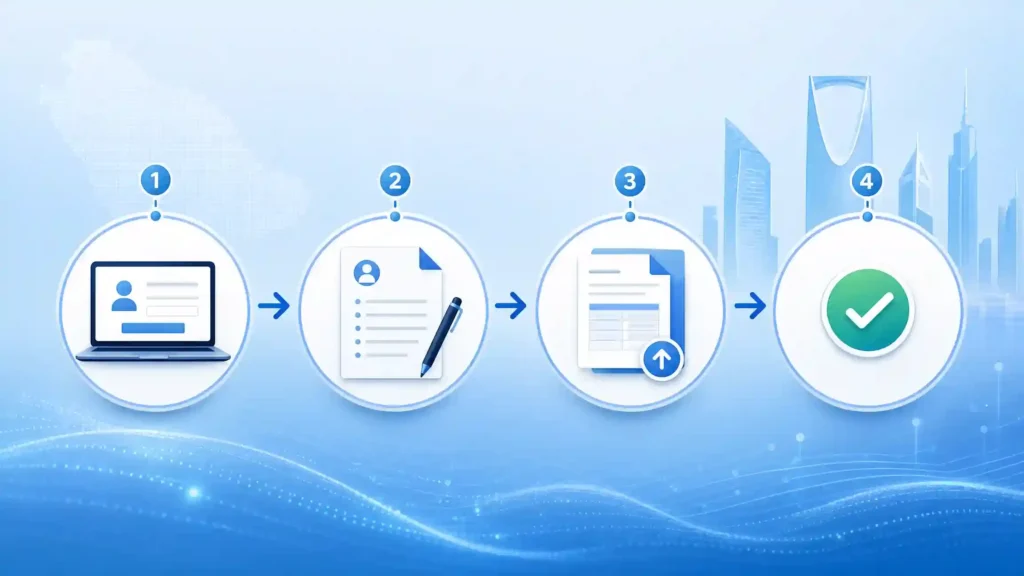
This online system lets companies check their employees’ information and complete important paperwork online, anytime and anywhere. This means less waiting in lines and faster service for your business, making it easier to manage your foreign workforce legally .
It’s important to know that Muqeem is specifically for businesses. It’s different from the “Absher” app, which is for individuals, and “Absher Business,” which is for small Saudi-owned businesses with 100 or fewer employees . If your company is a larger business, whether Saudi or foreign, Muqeem is the platform you need to use.
Using Muqeem Business correctly is very important for your business in Saudi Arabia. The government has connected all the worker and immigration systems. This means if an employee’s Iqama (residency permit) expires even for one day, your company could face fines, lose the ability to get new work visas, and have problems with other government systems like Qiwa and Mudad . So, managing Muqeem well helps you avoid these kinds of headaches.
What Is Muqeem Business in Saudi Arabia?
Muqeem Business is a digital service provided by Elm for establishments in Saudi Arabia that need to manage information and eligible passport-related transactions for resident employees. Instead of treating Muqeem as a general business-registration platform, it is more accurate to describe it as a workforce and passport-services solution for organizations. Depending on the services available to the establishment, businesses can use Muqeem Saudi Arabia to access resident employee information and process services related to residency and travel documentation electronically. The exact services and eligibility can depend on the establishment and the current Muqeem service offering, so companies should always verify the latest requirements through the official platform or Elm.
Muqeem Services for Iqama, Visas and Employees
The main value of Muqeem services is the ability to handle several employee-related government transactions electronically. Available services can include Iqama issuance and renewal, visa-related transactions, exit and re-entry services, final exit services, employee information, profession-related services, transfer services, reports and other electronic transactions. The available transaction depends on the establishment’s eligibility and the current rules governing each service. For HR departments managing a large number of expatriate employees, Muqeem can reduce manual administrative work by providing a centralized way to access employee and passport-related information rather than relying on separate paper-based processes.
Muqeem Registration and Login for Businesses
Businesses that want to use Muqeem registration should first check the current requirements shown by the official Muqeem platform. The registration process can involve providing establishment information, identifying an authorized user and completing the required verification and activation steps. Requirements should not be assumed to be identical for every company because Muqeem can update its onboarding procedures and subscription options. After the organization has been registered, the authorized user can use Muqeem login through the authentication method currently provided by the platform. If login, activation or account-access problems occur, the safest approach is to use the current support and account-recovery options available through Muqeem rather than relying on outdated instructions from third-party websites.
Muqeem Subscription Packages and Fees
Muqeem subscription fees and packages can vary according to the service model selected by the establishment and the transactions or features it needs. Businesses should therefore check the current official Muqeem pricing information before making a payment instead of relying on an old fixed annual price. Elm has also introduced newer Muqeem subscription models, including Basic, Advanced and Professional, as part of its continuing development of the service. This means older references to packages such as Comprehensive or Operations may not fully describe the current offering. In addition to any Muqeem subscription charges, businesses should distinguish the platform’s service fees from separate government fees that may apply to individual immigration, residency or visa transactions.
Simple Explanation of Muqeem Services for Businesses
The Muqeem Business platform offers many helpful services for businesses in Saudi Arabia. Let’s look at the most important ones.

Visas: Managing Employee Travel
Muqeem makes managing visas much easier. Companies can use it to get and cancel single or multiple exit and re-entry visas for employees who need to travel. It also helps with final exit visas for employees leaving Saudi Arabia for good. If an employee is outside Saudi Arabia and their visa is about to expire, Muqeem can help extend it, keeping their legal status safe .
Residency (Iqama): Keeping Permits Up-to-Date
Keeping employee residency permits (Iqamas) valid is crucial. Muqeem lets HR managers renew Iqamas quickly once fees and insurance are paid. You can also check if an Iqama or visa is still valid, update employee passport details, and change job titles to match what’s on their Qiwa contract .
Employee Records: Easy Management
For companies with many international staff, Muqeem helps keep all employee information in one place. You can add new employees, update their details, or remove them from your company’s records. The system also lets you create important reports for each employee, which are often needed by government offices and banks .
New Employee Arrival: What to Do
When a new employee arrives in Saudi Arabia, their arrival should be registered on Muqeem within 72 hours. This step is important for things like checking vaccination records and making sure they can enter the country smoothly .
How to Register Your Business for Muqeem: Step-by-Step
Signing up for Muqeem is the first big step for foreign investors starting a business in Saudi Arabia. Here’s a simple guide:
What You Need Before You Start
Before you begin, make sure you have these documents ready:
- Your company’s valid business registration in Saudi Arabia.
- Membership with the Chamber of Commerce.
- Official company documents from your home country, properly approved.
- Documents approved by the Saudi embassy.
- Identification for the person who can sign for your company.
- A valid tax certificate from ZATCA (the tax authority) .
Easy Steps to Register
- Go Online: Visit the official Muqeem website at muqeem.sa and choose the option to register your organization .
- Tell About Your Company: Fill out the company registration form with correct details like your business registration number, what your business does, and who represents your company .
- Upload Documents: Upload all the required papers, such as your approved business registration and Chamber of Commerce certificate. You’ll also need a letter from your company saying who can manage the Muqeem account, and this letter needs to be approved by the Saudi Chamber of Commerce .
- Activate Your Account: After your documents are checked and you’ve paid the fees, the person you chose to manage the Muqeem account will get a temporary password on their phone. This phone number must be linked to their Absher account, as Absher is used for logging into many government services .
Muqeem Costs: Understanding Subscription Plans
When you sign up for Muqeem, you’ll pick a plan based on how big your company is and how many transactions you expect to make.
| Feature | Muqeem Comprehensive | Muqeem Operations |
| Best For | Big Companies, Companies with Many Transactions | Small to Medium Companies, Fewer Transactions |
| Yearly Fee | Higher yearly fee | Lower yearly fee |
| Transaction Cost | Unlimited free transactions* | Pay for each transaction |
*Note: Even with the Comprehensive plan, you still need to pay government fees (Jawazat fees) for each visa or renewal .
The yearly cost depends on how many foreign employees you have, which plan you choose, and if you add any extra services. You pay for Muqeem services using the SADAD system with a special code: 085 for Elm Company (Muqeem services). Remember, this is different from code 092, which is for Passport fees .
How Muqeem Works with Other Saudi Government Systems
Muqeem Business doesn’t work alone; it’s connected to other important Saudi government systems to make sure everything runs smoothly.
- Qiwa: This system handles employee work contracts. Information from Qiwa automatically goes to Muqeem. To renew an employee’s Iqama, they must have a valid work permit from Qiwa . If a contract isn’t approved in Qiwa, it can stop Muqeem from renewing the Iqama .
- Absher: This is the main login system for many government services. The person managing your Muqeem account must have an active Absher account to log in .
- Mudad: This system deals with salary payments. If Mudad shows that salaries are delayed, Muqeem might stop you from issuing exit and re-entry visas .
- Automating Tasks (Rabet): For bigger companies that want to automate their HR tasks, Elm Company offers a way to connect Muqeem to their own internal systems through a platform called “Rabet.” This helps process Passport tasks automatically .
Common Problems and Simple Solutions for Muqeem Business Users
Businesses sometimes face challenges when using Muqeem. Here are some common issues and how to fix them easily.
Document Problems
Getting international documents approved can be tricky. To avoid issues, use certified translation services, make sure your documents are properly approved by the Saudi embassy, keep digital copies of everything, and consider getting help from local business setup experts .
Missing Medical Report
If an employee’s medical report isn’t uploaded to the Efada system by an approved clinic, their Iqama renewal on Muqeem will fail. Always make sure the medical check is done at least two days before you try to renew the Iqama .
Expiring Passports
Muqeem won’t let you issue an exit and re-entry visa if an employee’s passport has less than 90 days left before it expires. HR managers should regularly check passport expiry dates using Muqeem’s “Reports” feature .
Health Insurance Issues
Health insurance must be directly linked to the Council of Health Insurance (CHI) system. If the insurance isn’t active in the CHI system, it won’t show up in Muqeem, and you won’t be able to renew the Iqama .
Easy Tips for Using Muqeem Business Well
To get the most out of Muqeem and keep your business running smoothly, follow these simple tips:
- Keep Documents Organized: Save digital copies of all your submitted documents and keep backups. Set up a system to know when documents need to be renewed .
- Train Your Team: Make sure the people who use Muqeem know how it works. Set clear rules for who can access sensitive information and provide regular training .
- Stay Updated: Set reminders for renewals and keep an eye on any new rules that might affect your business. Regularly check to make sure you’re always following the rules .
What’s Next for Muqeem in 2026?
The Muqeem platform is always getting better. In 2026, you can expect even more improvements:
- Better Digital Tools: Expect easier ways to connect Muqeem with your company’s systems, improved mobile apps, and new technologies like blockchain and AI to make things faster .
- More Services: New services are coming, such as help with applying for investment incentives and special visas for skilled workers or digital nomads .
- Easier to Use: The system will become even more user-friendly with more language options, 24/7 online chat support, and helpful video guides .
Muqeem Business Conclusion
The Muqeem platform is a very important tool for doing business in Saudi Arabia. It helps foreign investors and companies manage their operations in the Kingdom.
By understanding and using Muqeem well, your business will be in a better position to take advantage of the many opportunities Saudi Arabia offers, especially with its Vision 2030 plans. Muqeem simplifies complex tasks like visa management and employee paperwork, which used to be big hurdles for foreign businesses. To succeed in the Saudi market, it’s not just about knowing Muqeem, but also having the right support to make sure your business starts and continues smoothly.
Muqeem Business Frequently Asked Questions (FAQs)
How long does it take to register for Muqeem?
It usually takes about 3-7 business days once all your documents are submitted and checked. But getting all your documents ready might take a bit longer .
Can I use Muqeem for more than one company?
Yes, if you have several companies, you can register each one with its own Muqeem account. Each company will need its own business registration and documents .
What if my Muqeem application is rejected?
If your application is rejected, it usually means some documents are missing or incorrect. Check why it was rejected, fix the issues, and send it again. For difficult situations, it’s a good idea to ask business experts for help .
Can I process a final exit visa for an employee who is outside Saudi Arabia?
Yes, if an employee is abroad and their exit/re-entry visa has expired, and all their payments have been settled through Mudad, you can process a Final Out visa for them .
Is there a Muqeem mobile app?
Yes, there’s a Muqeem app for both iPhones and Android phones. It lets managers approve visas and check employee status on the go, with secure login using fingerprints or face ID .
How fast do Muqeem changes show up?
Changes made through Muqeem are usually instant. As soon as you confirm a transaction and get a success message, the information is updated across all government systems .
What if I lose access to my Muqeem account?
If you lose access, you’ll need to reset your password through the Nafath portal or visit an Elm service center with your company’s authorization letters to get your account back .
Can a company with a “Red” Nitaqat status use Muqeem?
Companies with a “Red” Nitaqat status can still use Muqeem for basic tasks like exit and re-entry visas or final exit visas. However, they usually can’t renew Iqamas or transfer employee sponsorships