
Absher Login: Official Portal Guide & Account Access
People search for “Absher login” when they need fast access to Saudi government services. They usually want the official login page, account help, or troubleshooting support. Most users feel confused because many fake pages look similar to the real platform.
Log in to Absher on the official site only
This page is a guide and is not the Absher login. Never enter your Absher username, password or verification code on an unofficial website. Use the official Absher site to sign in.
Absher is the official digital platform of the Saudi Ministry of Interior. It provides secure access to government services for citizens, residents, and businesses. You should always use the official Absher website or mobile app to avoid fraud or phishing risks.
This guide helps you understand how Absher login works in a simple way. It also helps you fix common login issues and access your account safely.
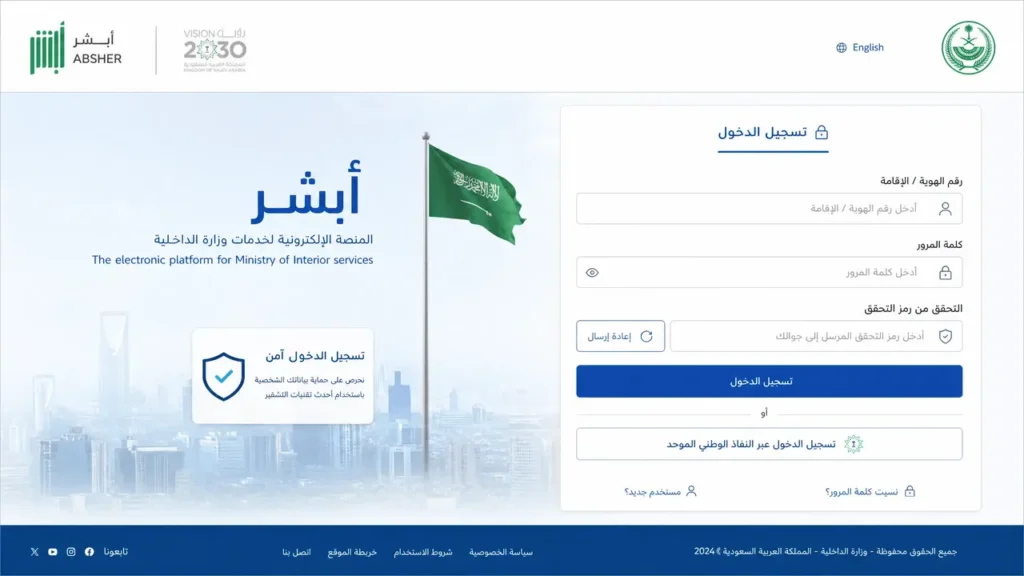
Absher login means accessing Saudi Arabia’s official government portal for identity-based digital services. Always use the official platform to protect your account and personal data.
This guide is for:
- Saudi citizens
- Expats and residents
- Business users
- Anyone accessing Saudi government services online
What is Absher?
Absher is a secure e-government platform used across Saudi Arabia. It connects users with essential government services in one digital system. Instead of visiting offices, users can complete tasks online within minutes. Absher plays a central role in Saudi Arabia’s digital ecosystem. It supports millions of users and continues to expand with new services.
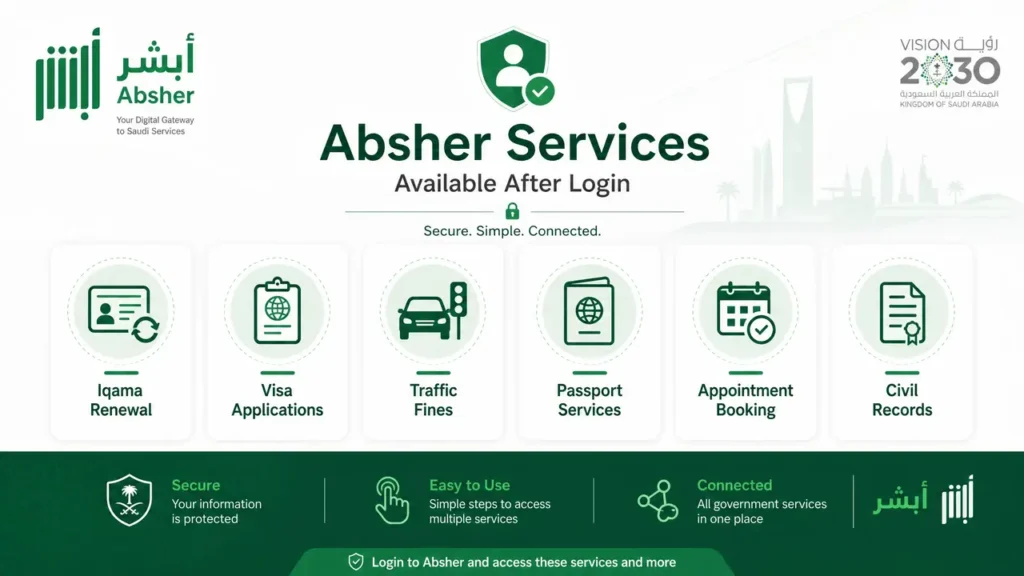
Absher helps simplify daily government tasks. It reduces paperwork, saves time, and improves access to official services for everyone.
Role in Saudi Digital Ecosystem
Absher acts as a central hub for identity and service management. It connects users directly with government departments through a secure login system.
It is widely used for:
- Identity verification
- Residency management
- Travel permissions
- Traffic and legal services
- Appointment booking
Government Services Available on Absher
Once logged in, users can access a wide range of services, including:
- Iqama issuance, renewal, and status checks
- Visa applications and tracking
- Traffic fines payment and vehicle services
- Passport and travel-related services
- Civil records and personal document management
- Appointment booking for government offices
Identity Verification and Security System
Absher uses strict security layers to protect user accounts. It ensures that only the real user can access sensitive information.
The platform uses:
- One-time password (OTP) verification
- Mobile number authentication
- Nafath digital identity system
- Secure encrypted login sessions
Why Absher is Mandatory in Saudi Arabia
Absher is not just optional—it is essential for most residents and citizens. Many government services require an active Absher account.
It is important because:
- It enables legal identity verification
- It supports residency and visa processes
- It reduces the need for physical office visits
- It improves speed and transparency of services
- It centralizes government communication in one system
Official Absher Login Portal
Absher login always starts with the official government portal. Users often land on fake pages that look similar. These pages try to steal personal data. You must avoid them completely.
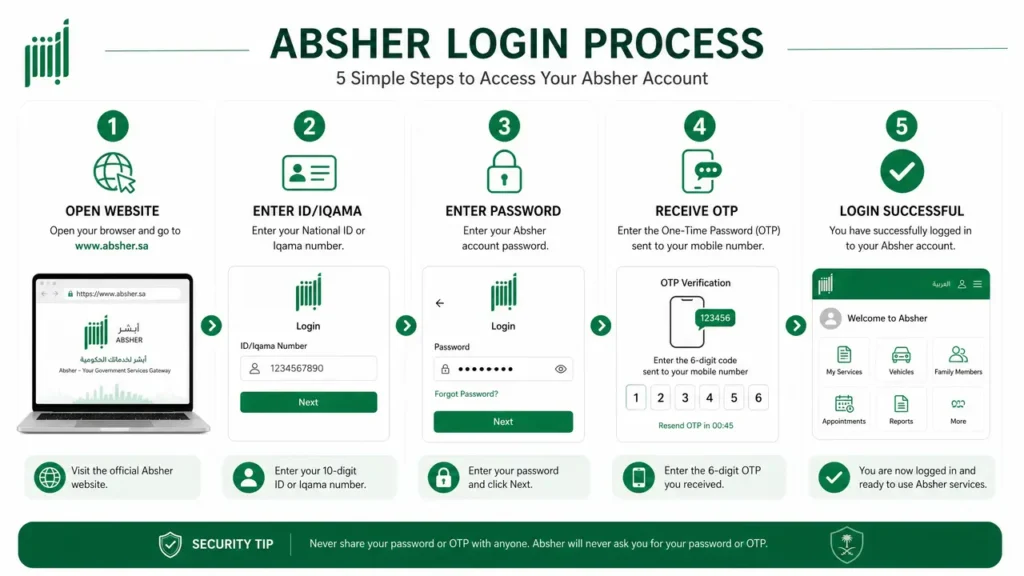
Absher only works through its official website and official mobile app. The correct domain always belongs to Saudi government infrastructure.
The login process is simple. You enter your username or ID number, then your password. After that, the system sends a verification code to your registered mobile number.
Official Login Method Includes:
- Username or National ID / Iqama number
- Secure password
- One-Time Password (OTP) sent to mobile
⚠️ Security Warning (Very Important)
- Do NOT use fake websites or third-party login pages
- Never share your password or OTP with anyone
- Avoid links from WhatsApp, SMS, or unknown emails
- Always type the official website manually in your browser
Official Access Reminder
Always confirm you are on the correct Absher platform before entering details.
Government systems never ask for your password outside the official login page.
Step-by-Step Absher Login Guide
Absher login is simple when you follow the correct steps. You can log in through the website, mobile app, or Nafath system depending on your setup.
Login via Website
Website login works best on desktop or laptop devices. It gives full access to all services.
Steps:
- Open the official Absher website in your browser
- Click on “Individuals” or “Business” login section
- Enter your Username or ID/Iqama number
- Type your password carefully
- Enter the OTP sent to your registered mobile number
- Click “Login” to access your account
Login via Mobile App
The Absher mobile app is designed for fast and secure access. It is available for both Android and iOS users.
Android & iOS Login Process:
- Download the official Absher app from Google Play or App Store
- Open the app and select login option
- Enter your ID or username
- Enter your password
- Confirm OTP sent to your mobile number
App vs Website Differences:
- App supports fingerprint or face ID login
- Website offers more detailed service navigation
- App is faster for daily quick tasks
- Website is better for complex service requests
Login via Nafath Integration
Some users may log in using the Nafath digital identity system. This adds an extra layer of security.
Nafath verifies your identity before granting access to Absher services.
Identity Verification Flow:
- Enter Absher login details
- System redirects to Nafath verification
- Confirm identity through Nafath app
- Approve login request on your mobile
- Return to Absher dashboard automatically
New User Registration in Absher
New users search for Absher registration when they want to access Saudi government services for the first time. The process is simple, but it needs correct identity details and a verified mobile number.
Absher requires strict identity validation to protect user accounts and national data. Every account links directly to official records. Get information about Saudi Arabia Work Visa vs Visit Visa
Requirements for Registration
You must prepare the following before creating an account:
- Valid Iqama number or National ID
- Active mobile number registered in your name
- Email address for verification and notifications
Step-by-Step Account Creation
The registration process is simple when you follow the correct flow.
- Visit the official Absher registration page
- Select “New User Registration”
- Enter your Iqama or National ID number
- Fill in your mobile number and email address
- Confirm verification code sent to your mobile
- Create a strong password
- Submit details to complete registration
Account Activation Process
After registration, Absher verifies your identity. Activation usually happens instantly if your mobile number is already registered in government systems.
Once activated, you can:
- Log in to Absher dashboard
- Access personal government services
- Manage your account securely
Username Rules
Absher usernames follow strict rules to maintain security and identity accuracy.
- Username cannot be changed after creation
- It must be unique across the system
- It must match system validation rules
- It should not contain special illegal characters
Forgot Password / Account Recovery
Many users search for account recovery when they cannot access their Absher login. The system provides secure recovery options to restore access without risking account safety.
Reset Password Steps
If you forget your password, Absher provides an official reset system.
Steps to reset password:
- Go to the official Absher login page
- Click on “Forgot Password” option
- Enter your ID or Iqama number
- Enter registered mobile number
- Complete image verification (captcha)
- Receive OTP on your mobile
- Enter OTP and create a new password
Forgot Username
Users sometimes forget their Absher username. Recovery options are limited for security reasons.
Available recovery methods:
- Check registration email for username details
- Use Absher support or help center
- Visit official service center if required
Locked Account Fix
Accounts may get locked due to security protection or repeated wrong attempts.
Common reasons for account lock:
- Multiple incorrect password attempts
- Suspicious login activity
- Expired or inactive credentials
- Security system protection triggers
Recovery method:
- Use password reset option first
- Verify OTP through registered mobile
- Follow account recovery steps carefully
- Contact official support if lock continues
Absher Login Problems & Fixes
Many users face issues while trying to access Absher login. Most problems come from wrong credentials, OTP delays, or device issues. These issues are common and usually easy to fix.
Absher uses strict security systems, so even small mistakes can block login temporarily. The system protects user accounts and government data.
Common Absher Login Issues
Here are the most frequent problems users face:
- Login not working or page not loading
- OTP not received on mobile
- Invalid username or password
- Account suspended or temporarily locked
- Mobile number mismatch with Absher records
Step-by-Step Fixes
Most login problems can be solved in a few minutes if you follow the correct steps.
Fix Login Not Working:
- Check your username and password carefully
- Clear browser cache and cookies
- Try a different browser or device
- Ensure stable internet connection
Fix OTP Not Received:
- Check mobile signal strength
- Restart your phone
- Wait a few minutes before requesting again
- Confirm your mobile number is registered in Absher
Fix Invalid Credentials:
- Recheck ID/Iqama number
- Reset password using official “Forgot Password” option
- Avoid repeated wrong attempts
Fix Mobile Number Mismatch:
- Update your mobile number through official Absher channels
- Ensure SIM is registered under your ID
Device, Browser & Network Issues
Sometimes the problem is not the account, but the device.
- Update your browser to the latest version
- Avoid using VPN or proxy connections
- Switch from mobile data to Wi-Fi if needed
- Disable browser extensions that block scripts
Server Downtime Explanation
Sometimes Absher services may not respond due to maintenance.
This is normal and temporary.
- Government systems often update security patches
- High traffic can slow down login access
- Wait and try again after some time
Absher App Login Guide
The Absher mobile app offers fast and secure access to government services. It is widely used by residents and citizens for daily tasks.
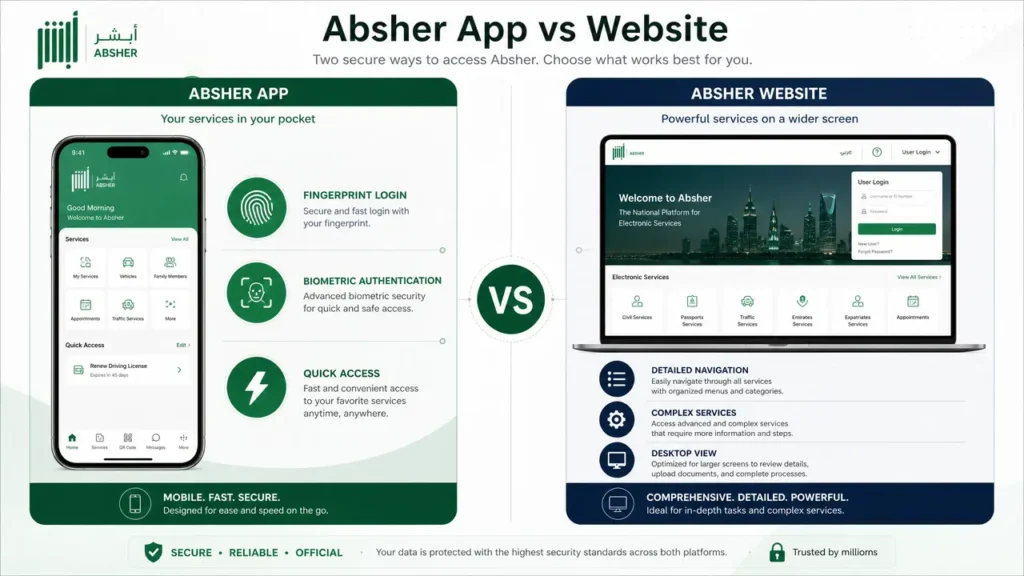
Absher allows secure login with advanced authentication features and biometric security.
Absher App Overview
The app provides full access to Absher services directly from your phone. It is available for both Android and iOS users.
Users can:
- Log in securely
- Access government services anytime
- Use biometric authentication for faster access
Key Features of Absher App
The app includes modern security and convenience features:
- Fingerprint login for quick access
- Face ID login on supported devices
- Secure OTP verification system
- Instant service notifications
App Login Troubleshooting
If the app does not work properly, try these fixes:
- Update the app to the latest version
- Clear app cache from settings
- Reinstall the application if needed
- Check internet connection stability
- Ensure correct login credentials
Absher Services After Login
After successful login, Absher becomes a complete digital service hub. It connects users with essential government operations in Saudi Arabia.
Services Available After Login
Once inside your account, you can manage many important tasks:
- Iqama services like renewal and status check
- Visa applications and tracking updates
- Traffic fines checking and payment (see our guide to traffic violation check by Iqama number)
- Passport renewal and travel services
- Appointment booking for government offices
- Civil record and identity services
Security & Safety Guidelines
Security is the most important part of Absher login. The platform handles sensitive identity and government data.
Important Safety Rules
- Never share your password with anyone
- Do not share OTP codes under any condition
- Always use the official Absher website or app
- Avoid links from SMS, email, or social media
- Always verify the domain before login
Absher Login for Businesses
Absher also supports business users through a separate system. It is designed for companies managing employee records and government services.
Absher Business provides secure access for organizations and employers.
Difference Between Individual and Business Accounts
- Individual account: personal use for citizens and residents
- Business account: employer and company-level services
Business Login Benefits
- Employee management tools
- Faster government processing
- Bulk service handling
- Secure enterprise access
Official Absher Login: How to Access Your Account Safely
If you are searching for Absher login, Absher official login, or the Absher login portal, use the official Absher website rather than a third-party login page. The current Absher Individuals portal provides a login form using your username or ID number and password, along with options for Forgot Password and New User registration.
Absher is the Ministry of Interior’s digital platform for services provided to citizens, residents and visitors. Because the account can contain sensitive identity and government-service information, never enter your Iqama number, National ID, password or verification information on an unofficial website. Always check that you have opened the official Absher platform before signing in.
Absher Registration and Account Activation
New users should distinguish between Absher registration and Absher account activation. The official Absher registration service asks users to provide their ID or residence ID information and a valid personal mobile number. After entering the required information, an activation code is sent to the registered mobile number, and Absher provides official activation channels for completing the process.
These can include designated registration and activation offices, participating banks and self-service machines. Therefore, users should not assume that simply submitting the online registration form always completes the entire activation process. Follow the activation instructions displayed by Absher at the time of registration because procedures and available activation channels can change.
Absher Forgot Password and Password Reset
If your Absher password is not working or you have forgotten it, use the official Absher Forgot Password option instead of creating another account or using an unofficial password-recovery website. Absher provides an electronic password-reset service for registered citizens and residents. The current official guidance also specifies password requirements, including a minimum length and a combination of character types, while preventing certain patterns that could weaken account security.
If the online reset process cannot be completed, Absher’s official guidance advises users to use an appropriate activation center or self-service channel when required. This makes Absher password reset, Absher account recovery, and Absher forgot password important parts of the normal account-support process rather than reasons to use third-party recovery services.
Absher Login Not Working: Common Problems and What to Check
When Absher login is not working, first determine whether the problem is related to your credentials, account, mobile number, browser or the Absher service itself. Check that you are using the correct username or ID number and password, then use the official password-reset option if you cannot remember the password. If registration or activation has not been completed, login may also be unavailable until the account is properly activated. Users should avoid repeatedly entering incorrect credentials and should never give their password or verification information to another person claiming to provide Absher support.
If the official Absher website is temporarily unavailable, check again later and use the platform’s official support channels rather than relying on unofficial “Absher support” websites or social-media accounts. The official portal provides contact and support resources for users who need additional assistance.
Absher Services After Login
After successful Absher login, the services available to you depend on your account and eligibility. The official Absher platform provides a broad range of Ministry of Interior e-services, including services related to passports, traffic, civil affairs, residency and other government transactions.
The current service directory, for example, lists services such as Iqama renewal, vehicle registration renewal, newborn registration, document delivery and several inquiry and appointment services. This means Absher should not be described as a single Iqama or visa application website; it is a broader digital government platform containing different services for eligible users. Before starting a transaction, open the relevant service from the official Absher service directory and check its current requirements.
Frequently Asked Questions
What is Absher login?
Absher login is the process of accessing Saudi Arabia’s official government e-services portal using verified credentials.
How do I log into Absher?
You enter your ID or username, password, and OTP on the official website or app.
Why is Absher login not working?
It may fail due to wrong credentials, OTP issues, or system maintenance.
How can I reset Absher password?
Use the “Forgot Password” option and verify your identity through OTP.
Can I use Absher without Iqama?
No, a valid ID or Iqama is required for account creation.
Is Absher login safe?
Yes, it uses government-level encryption and OTP-based security systems.
What is Nafath in Absher login?
Nafath is a national digital identity system used for secure verification during login.