
Work Permit Expiry Check Using Iqama Number in Saudi Arabia
A work permit expiry check using Iqama number helps expatriate workers confirm whether they are legally authorized to continue working in Saudi Arabia. Checking the permit before it expires can prevent complications involving Iqama renewal, employment transfers, government services, and the worker’s official labor record.
Work Permit Expiry Checker
Quickly calculate your permit status for Saudi Arabia
Status Guide (From Blog):
| Status | Meaning |
|---|---|
| Valid | The permit is active and authorized. |
| Expiring Soon | Less than 30 days left. Contact employer. |
| Expired | Authorization ended. Immediate action required. |
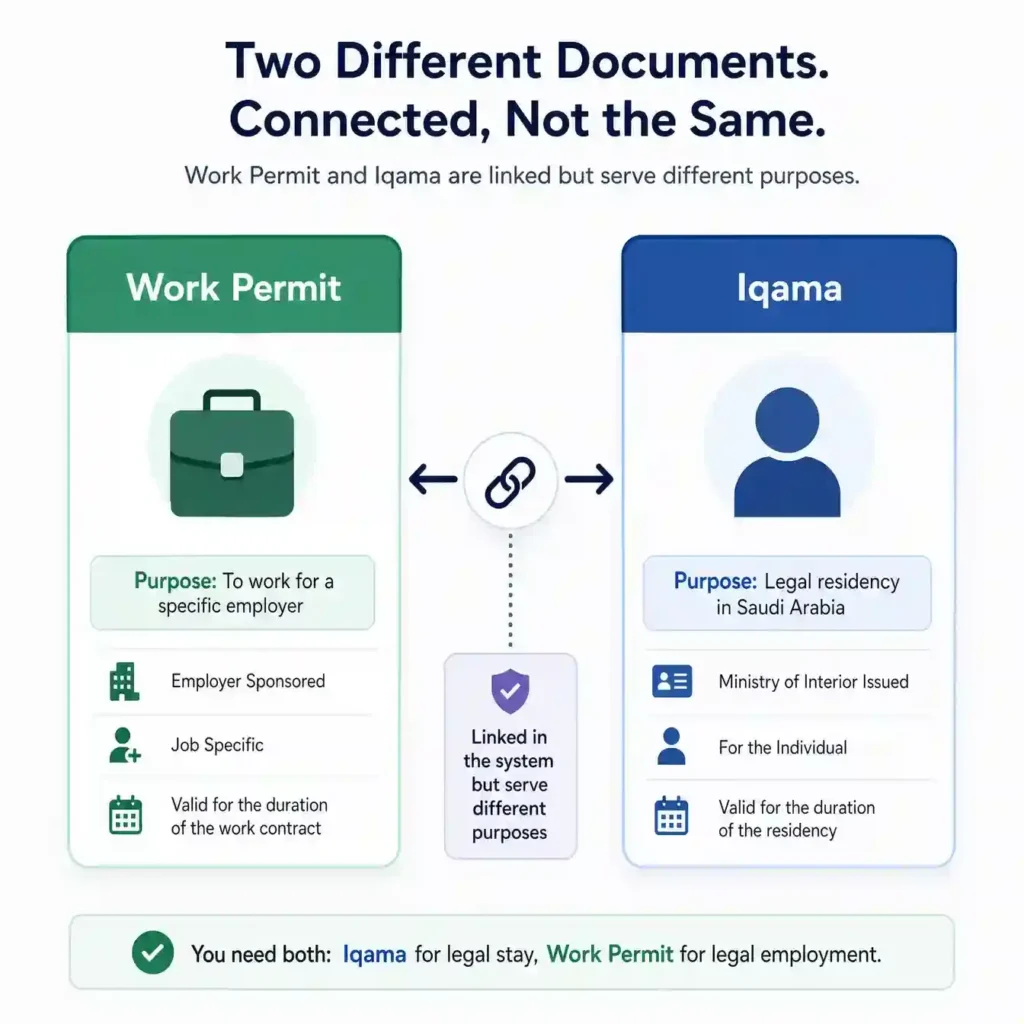
Saudi work permits are primarily managed through Qiwa, the official digital labor platform supervised by the Ministry of Human Resources and Social Development. Employees should understand that a work permit and an Iqama are connected documents, but they serve different legal purposes. Muqeem Exit Re-Entry Visa Check 2026
How to Check Work Permit Expiry
The most reliable way to check a Saudi work permit is through the official Qiwa platform. Employees can sign in through National Access, open their employment profile, and review information connected with their current employer, profession, employment contract, and work authorization.

Employers can access more detailed permit information through their Qiwa business account. They can search for an expatriate employee, view permit eligibility, submit an issuance or renewal request, generate a payment reference, and monitor whether the work permit has been successfully activated.
| Information Required | Official Platform |
|---|---|
| Work permit status | Qiwa |
| Work permit renewal | Qiwa Business |
| Employment contract | Qiwa |
| Iqama expiry date | Absher |
| Residence renewal | Absher Business or Muqeem |
| Labor complaint | HRSD |
What Is a Saudi Work Permit?
A Saudi work permit is an official authorization that allows a non-Saudi resident to work for a registered employer. It is sometimes called a labor card, Maktab Amal permit, or MOL work permit in older online guides and expatriate communities.
The permit connects the employee with a specific establishment, profession, labor contract, and employment record. Employers must manage work permits through approved government systems and ensure workers remain legally authorized during the entire employment relationship.
Information Connected With a Work Permit
A work permit record may include the worker’s identification details, registered occupation, employer name, establishment information, permit status, and validity period. Additional details may appear depending on the services available inside the employee’s or employer’s Qiwa account.
Work Permit vs Iqama: What Is the Difference?
An Iqama is the official residence identity document issued to expatriates living in Saudi Arabia. It confirms a person’s legal residency status and contains important identification information used for banking, healthcare, travel, mobile services, and government transactions.
A work permit authorizes the expatriate to perform employment activities. A person may therefore have an Iqama record and a separate work permit record. Both must remain valid, but their expiry dates, issuing authorities, and renewal procedures may be different.
Why Both Documents Matter
The work permit is normally required before an employer can complete or continue the Iqama renewal process. If the permit expires or becomes blocked, the employer may face difficulties renewing the worker’s residency document through Absher Business or Muqeem.
How to Check Work Permit Expiry Using Iqama Number
To complete a work permit expiry check using Iqama number, start by visiting the official Qiwa website. Avoid unofficial websites that request payment, banking information, login passwords, or verification codes merely to display basic permit information.
Qiwa may occasionally update its interface, menu names, and account structure. The exact labels visible to an employee can therefore change, but the relevant information is generally found under employment services, current job information, contracts, or employee records.
Step 1: Visit the Qiwa Platform
Open the official Qiwa website and select the individual sign-in option. Confirm that you are using the genuine government platform before entering personal details. Look carefully at the website address and avoid links sent through suspicious messages or social media accounts.
Step 2: Sign In Through National Access
Enter the required account information and complete authentication through National Access or Nafath. Never approve an unexpected Nafath request. Government login approval should only be completed when you personally initiate the sign-in process on an official platform.
Step 3: Open Your Employment Profile
After signing in, select your individual account and open the section containing your current employment details. Depending on the current interface, this information may appear under your job profile, employment contracts, employee services, or professional record.
Step 4: Review Work Permit Information
Check the employer name, registered profession, permit status, and any available expiry or renewal information. The details should match your actual employment situation. Contact your employer immediately when the establishment or occupation shown in Qiwa appears incorrect.
Step 5: Save the Expiry Details
Record the displayed date and permit status for future reference. You may keep a private screenshot, but avoid sharing it publicly. Work permit pages can contain sensitive information such as your Iqama number, employer details, profession, and employment history.
How Employers Check and Renew Work Permits
The employer or an authorized establishment representative manages work permit issuance and renewal through a Qiwa business account. Employees can review certain employment details, but they normally cannot independently complete the official renewal transaction.
The establishment must select the employee, submit the appropriate permit request, generate the payment information, and complete the required payment through an approved banking channel. The employer should then verify that the status has updated successfully before proceeding with Iqama renewal.
Employer Renewal Process
The employer signs in to Qiwa Business, chooses the correct establishment, opens work permit services, and selects the employee. After reviewing eligibility and permit duration, the employer submits the application, pays the generated amount, and checks the updated status.
How Long Does the Update Take?
A payment may not appear instantly across every government platform. Qiwa may update first, while connected residency systems can require additional processing time. Employers should verify the payment reference and contact official support when the status remains unchanged beyond the normal processing period.
How to Check Iqama Expiry Through Absher
Work permit validity should not be confused with Iqama validity. Residents can use the official Absher platform to check their Resident ID information, including the Iqama’s current status and expiry date.
The Absher result confirms residency validity rather than employment authorization. A valid Iqama does not automatically prove that the employee’s work permit is active. Workers should check Qiwa and Absher separately to obtain a complete picture of their legal status.
Checking Iqama Expiry
Sign in to Absher Individuals, open the relevant resident or identity service, and review the expiry information connected with your account. Employers may use Absher Business or Muqeem for authorized residence-management procedures, including eligible Iqama renewals.
Understanding Work Permit Status Results
The result displayed in Qiwa may show that a work permit is valid, approaching expiry, expired, awaiting payment, under processing, unavailable, or blocked from renewal. Each status requires a different response from the employee or employer.
Workers should not focus only on the expiry date. They should also review the registered profession, establishment, employment relationship, and contract details. Incorrect information can create problems during inspections, job transfers, profession changes, contract renewals, or future government applications.
| Permit Status | Meaning | Recommended Action |
| Valid | The permit is active | Record the expiry date |
| Expiring soon | Renewal should be prepared | Contact the employer |
| Expired | Work authorization has ended | Request immediate action |
| Awaiting payment | Application may be incomplete | Employer should complete payment |
| Under processing | System update is pending | Recheck later |
| Not found | Record may be unavailable or incorrect | Verify employee details |
| Renewal blocked | Eligibility requirements are not satisfied | Employer should review Qiwa alerts |
Valid Work Permit
A valid result means the employment authorization is currently active. However, workers should also confirm that their Iqama, passport, medical insurance, employment contract, and registered profession remain accurate and valid.
Expired Work Permit
An expired result means the permit’s approved validity period has ended. The employee should notify the employer through a written and traceable communication channel and request confirmation that the renewal process has started.
Awaiting Payment
This status commonly means that an application or payment reference has been created but payment has not been completed or registered. The employer should review the request and confirm that the correct payment was submitted.
Work Permit Not Found
A missing result may occur because incorrect information was entered, the employment record has changed, the employee is linked to another establishment, or the service is temporarily unavailable. Verify the Iqama details and ask the employer to review the business account.
Common Reasons Work Permit Renewal Fails
A permit renewal can fail because of establishment compliance problems, incorrect employee information, an expired passport, unresolved government charges, a profession mismatch, pending worker-transfer procedures, or temporary synchronization issues between official systems.
The exact reason should normally appear inside the employer’s Qiwa account. Repeatedly submitting the same application without addressing the displayed error is unlikely to solve the problem. The employer should identify and correct the underlying restriction first.
Incorrect Iqama or Employee Details
Entering an incorrect Iqama number can return no result or display an unrelated record. Every digit should be checked carefully against the worker’s official Resident ID before submitting an inquiry or renewal application.
Expired Passport
An expired passport can affect connected residency and identity procedures. The worker may need to renew the passport through the appropriate embassy or consulate and ensure that the updated information is registered in the relevant Saudi systems.
Incorrect Registered Profession
The profession registered in Qiwa and other government records should reflect the employee’s authorized occupation. A mismatch may require an official profession-change procedure before certain employment or residency services can be completed.
Establishment Compliance Issues
An employer may be prevented from renewing permits because of localization requirements, establishment classification, expired business records, unresolved violations, or other compliance conditions. The establishment must resolve the relevant issue through Qiwa or HRSD.
Payment Not Updated
When payment has already been completed but the permit remains unchanged, the employer should verify the transaction number and payment status. If necessary, the establishment should contact Qiwa or HRSD support rather than paying a second time without confirmation.
Who Is Responsible for Work Permit Renewal?
The employer is generally responsible for issuing and renewing the expatriate employee’s work permit and residence documentation. The worker should cooperate by maintaining a valid passport, providing accurate information, and notifying the employer about approaching expiry dates.
Employees should keep copies of renewal requests, messages, and permit results when an employer repeatedly delays action. Written records can be important when requesting assistance from the Ministry of Human Resources and Social Development.
Who Pays the Renewal Charges?
Work permit and employment-related government charges are generally an employer responsibility under Saudi labor regulations. Employees should be cautious when an employer or intermediary demands personal payment for costs that legally belong to the establishment.
When Should Renewal Begin?
Employers should begin the process well before the permit expires. The available renewal period and eligibility conditions are displayed in Qiwa. Early preparation provides time to resolve passport, payment, profession, establishment, or system-related issues.
What to Do If Your Work Permit Has Expired
Contact the employer or human resources department immediately and request written confirmation of the renewal status. Ask whether an application has been submitted, whether payment remains pending, and whether any Qiwa restriction is preventing completion.
Do not continue relying on verbal promises when the permit remains expired. Keep screenshots and written communications. When the employer refuses to act or unlawfully shifts its responsibilities to the worker, contact HRSD through an official support or complaint channel.
Contact the Ministry of Human Resources
The Ministry of Human Resources and Social Development provides digital support, labor inquiries, complaint services, and customer assistance. Workers can visit the official HRSD website to find the correct service for their situation.
Ask the Employer for Proof of Renewal
The employee may request a copy of the application status, payment confirmation, or updated permit record. This helps distinguish a genuine processing delay from a situation where the employer has not initiated the renewal.
Work Permit Checking Safety Tips
An Iqama number is sensitive personal information. Enter it only on official government platforms or systems used by an authorized employer. Never share passwords, one-time codes, Nafath approvals, banking details, or full identity documents with unknown individuals.
Scammers may claim they can renew an expired permit instantly or remove a government restriction for a fee. Legitimate work permit management takes place through the employer’s Qiwa account and approved government payment systems, not through private social media agents.
Avoid Unofficial Checking Websites
Third-party websites may provide general guidance, but they should not be treated as the final source for legal status, permit fees, or expiry information. Always confirm the result through Qiwa, Absher, Muqeem, or HRSD.
Frequently Asked Questions
Can I Check My Work Permit With an Iqama Number?
Yes. Your Iqama number is connected with your employment record. However, the current process may require you or your employer to sign in through Qiwa rather than using a public no-login search form.
Which Website Shows Work Permit Expiry in Saudi Arabia?
Qiwa is the primary platform for Saudi work permit and employment services. HRSD provides related support and labor inquiries, while Absher is mainly used for checking Iqama validity and accessing residency services.
Can I Check Work Permit Status Without Absher?
Yes. Work permit information is primarily managed through Qiwa. Absher is used for residency and Iqama-related information, although National Access verification may still be required when signing in to government platforms.
Is Work Permit Expiry the Same as Iqama Expiry?
No. These are separate records. The work permit confirms employment authorization, while the Iqama confirms legal residence. Both documents should be checked independently because their expiry dates may be different.
Can an Employee Renew Their Own Work Permit?
Normally, the employer or authorized establishment representative must complete the renewal through Qiwa Business. Employees can check their employment details and request action, but they usually cannot submit and pay for the official permit renewal themselves.
What Is Maktab Amal?
Maktab Amal refers to the Saudi Labor Office and its employment-related services. Older searches such as MOL KSA work permit check or Maktab Amal inquiry now commonly lead users toward HRSD and Qiwa services.
What Happens When a Work Permit Expires?
An expired permit can affect Iqama renewal, employment compliance, worker transfers, and access to connected government procedures. The employer should resolve the issue immediately and complete the required renewal steps through Qiwa.
Who Pays for Work Permit Renewal?
The employer is generally responsible for the employee’s work permit issuance and renewal charges. Workers should keep evidence when an employer asks them to pay costs that should legally be covered by the establishment.
How Can I Check My Iqama Expiry Date?
Sign in to Absher Individuals and open the service related to Resident ID or Iqama validity. Review the displayed expiry information and contact your employer when renewal is approaching.
Why Is My Permit Status Not Updating?
The delay may result from incomplete payment, system synchronization, incorrect employee data, establishment restrictions, or a pending government process. The employer should review the Qiwa notification and verify the payment reference before taking further action.
Related guides
- Browse the full work permit and labor office section
- Work permit validity inquiry guide (Arabic)
- Complete guide to checking your Saudi work permit
- Check your employment status with the labor office