
Iqama Expiry Data Check Online 2026: Check Iqama Expiry Date
Iqama expiry data shows the current status and expiration date of your Saudi Resident ID (Iqama). Residents can check this information through the official Absher services provided by Saudi Arabia’s Ministry of Interior. The official Resident ID expiry query shows whether the Iqama is active or expired and provides its expiration date.
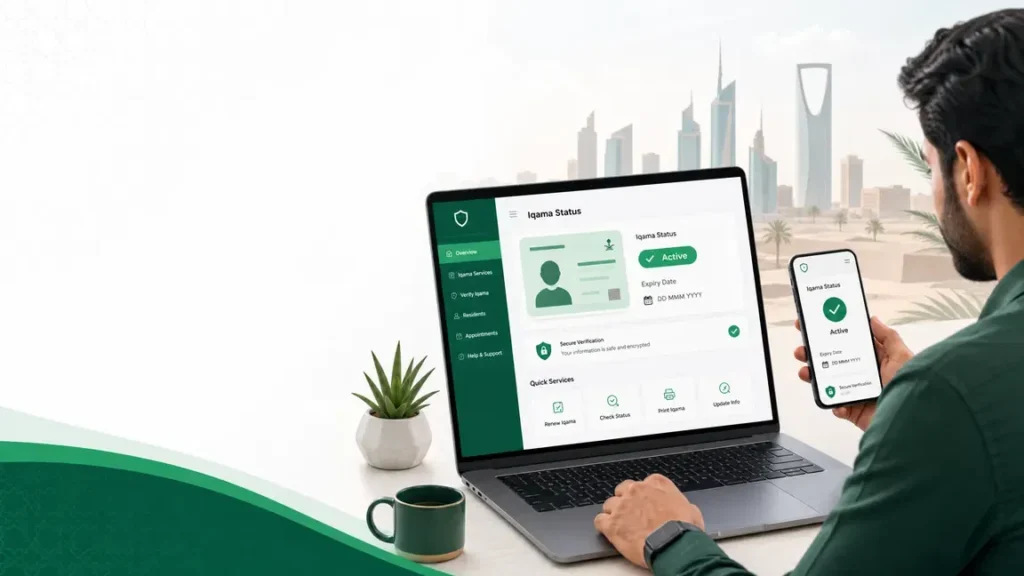
Iqama Expiry Data Check — Quick Answer
| Information | What it tells you |
|---|---|
| Iqama status | Shows whether the Iqama is active or expired |
| Expiry date | Shows the date your Resident ID expires |
| Iqama number | Identifies your Saudi Resident ID |
| Validity | Shows whether the Iqama remains valid |
| Renewal status | Helps confirm whether updated expiry information appears |
What is the fastest way to check Iqama expiry?
The fastest official route is Absher → Public Query Resident ID Expiry. The service lets residents check their Iqama status and expiration date through Saudi Arabia’s official Absher platform.
What Is Iqama Expiry Data?
An Iqama is the Saudi Resident ID issued to eligible residents. It identifies a resident and carries important residence information.
The Iqama expiry date tells you when the Resident ID expires. Muqeem Visa Validity Check tells you whether it remains valid at the time you check it.
The Iqama status gives the current state of the document. For example, the official Absher query can show whether the Iqama is active or expired.
Iqama Expiry Terms Explained
| Term | Meaning |
|---|---|
| Iqama expiry date | The date the Resident ID expires |
| Iqama validity | Whether the Iqama remains valid |
| Iqama status | The current active or expired state |
| Iqama renewal | The process of extending the Iqama’s validity |
How to Check Iqama Expiry Date Online
You can check your Iqama expiry date online through the official Absher platform. Absher provides a dedicated Public Query Resident ID Expiry service for residents.
Check Iqama Expiry Through Absher
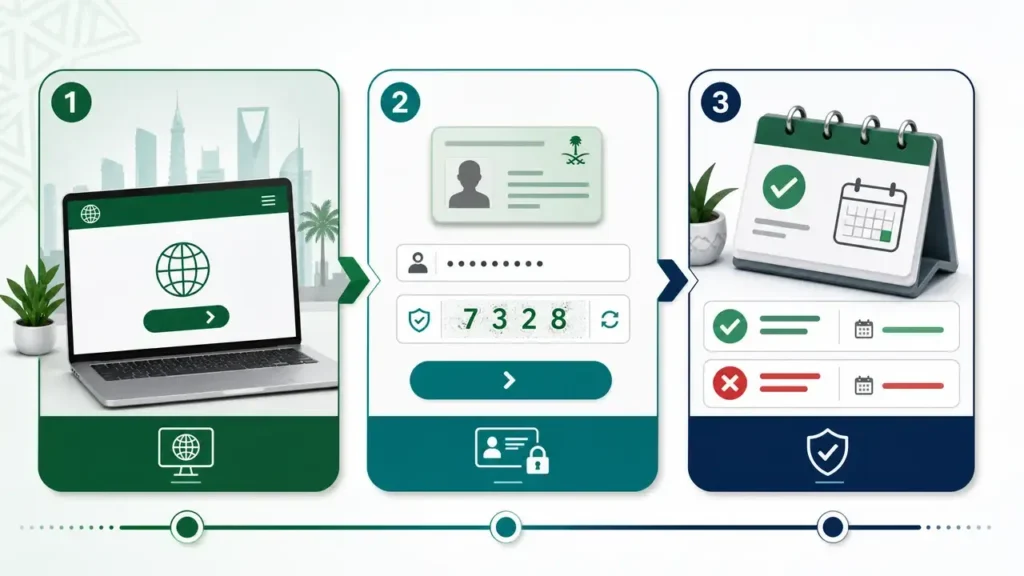
Follow these steps to check your Iqama expiry information:
Step 1: Open the official Absher platform
Go to the official Absher website and access the Individuals platform.
Step 2: Open the Resident ID expiry inquiry
Select E-Services. Then choose Employee Inquiries and open Public Query Resident ID Expiry.
Step 3: Enter the required information
Enter the required Resident ID number. The official service also lists a visual verification code as a requirement.
Step 4: Complete verification
Enter the verification code shown on the page if requested. Absher lists this visual code as part of the service requirements.
Step 5: View your Iqama expiry information
Submit the inquiry to view your Resident ID information. The service shows the Iqama’s validity status and indicates whether it is active or expired. It also provides the expiration date.
What does the Absher result mean?
- Active: Your Resident ID remains valid.
- Expired: Your Resident ID has passed its expiry date.
- Expiration date: This shows when your current Resident ID validity ends.
The service only provides an inquiry. It does not renew the Resident ID. Absher handles renewal through a separate service.
How to Check Iqama Expiry Without Absher
Can I check Iqama expiry without an Absher account?
The official Public Query Resident ID Expiry service currently requires a digital ID on the Absher platform. Therefore, you should not describe an unofficial website as an equivalent government Iqama expiry checker.
Other government services may provide related resident information for specific purposes. For example, employer-facing services can handle employee and Resident ID processes. However, their purpose may differ from the personal expiry inquiry.
You may also find third-party websites offering Iqama expiry check services. These sites are not automatically government services. Check the website’s ownership and security before entering any information.
Protect your Iqama information
Never enter your Iqama number, Absher password, OTP, or other personal information into an unknown website.
Use official Saudi government platforms for sensitive resident services. This helps protect your account and personal information.
How to Check Iqama Expiry Using Iqama Number
The Iqama number is the identification number linked to a resident’s Saudi Resident ID. Government services may request this number to identify the correct resident record.
Check Iqama Expiry by Number
You can use your Iqama number when an official Saudi government service asks for it. However, entering the number alone does not automatically reveal official expiry data on every website.
For the official Public Query Resident ID Expiry service, Absher’s current documentation lists the Resident ID number among the required information. It also requires a visual verification code.
Use your Iqama number only on trusted government platforms. Avoid websites that promise an Iqama expiry check without clear official authorization.
Why should you protect your Iqama number?
Your Iqama number is personal identification information. Do not share it with unknown websites or services.
Never enter your Absher password or OTP on a third-party Iqama checking website.
How to Know If Your Iqama Is Expired
How can I tell if my Iqama is still valid?
The easiest way is to use the official Absher Resident ID expiry inquiry.
The result can show whether your Resident ID is active or expired. It also provides the Resident ID’s expiration date.
- Active: Your Iqama remains valid.
- Expired: Your Iqama has passed its expiration date and may require renewal or other action.
- Expiry date: This tells you when the current Resident ID validity ends.
The status shown by the official government service should take priority over information from an unofficial website.
How to Read Your Iqama Expiry Date
Your Iqama expiry information may involve the Hijri and Gregorian calendars. Understanding both formats helps you avoid confusion when checking your Resident ID.

Iqama Expiry Date in Hijri
Saudi government systems commonly use the Hijri calendar for official dates. Your Iqama record may therefore display an expiry date in Hijri format.
The Hijri date follows the Islamic lunar calendar. Its date does not match the Gregorian calendar day-for-day.
Iqama Expiry Date in Gregorian
The Gregorian calendar is the calendar used internationally. Some digital services may also display or reference dates in this format.
Always check which calendar the government service uses before interpreting the date.
Why Hijri and Gregorian Dates May Look Different
Hijri and Gregorian calendars use different systems. A single Hijri date corresponds to a different Gregorian date.
This difference can cause confusion when checking an Iqama expiry date.
Do not assume that a displayed date is Gregorian. Check the calendar label shown by the official service.
How to Convert an Iqama Expiry Date
You can use a reliable Hijri-to-Gregorian converter to understand the equivalent date. However, a converted date is only a reference.
The official government record remains the authoritative source for your Iqama expiry information.
If a conversion differs slightly from another online converter, do not replace the official expiry date with the converted result. Check the date directly through the relevant Saudi government service.
Iqama Expiry Date vs Iqama Validity vs Iqama Status
These terms describe different parts of your Resident ID information.
| Concept | Meaning |
|---|---|
| Expiry date | The date your Iqama validity ends |
| Validity | Whether the Iqama is currently valid |
| Status | The current state, such as active or expired |
| Renewal | The process used to extend the Resident ID |
Is Iqama expiry the same as Iqama validity?
No.
The expiry date is a specific date. It tells you when the current validity ends.
Iqama validity describes whether the Resident ID remains valid now.
For example, an Iqama can have a future expiry date and remain valid today. Once that date passes, its status may show as expired.
Absher’s official Resident ID expiry inquiry separates the Resident ID’s status, validity, and expiration date.
Iqama Expiry Date vs Work Permit Expiry
Your Iqama and work permit are related but different records.
The Iqama is your Saudi Resident ID. It relates to your legal residence and identification as a resident.
A work permit relates to your authorization to work under the applicable employment system. It also connects to your employment relationship and employer responsibilities.
The two expiry dates are not necessarily identical. Do not assume that a work permit expiry date automatically represents your Iqama expiry date.
For employer-side Iqama renewal, official Absher Business guidance lists a valid work permit among the requirements for the relevant worker renewal service.
This means employers may need to keep both records current. The employer or sponsor handles relevant renewal actions where the service applies.
If you need your exact Resident ID expiry date, check the official Iqama inquiry rather than using the work permit date as a substitute.
What Happens When an Iqama Expires?
When your Iqama expires, the official Resident ID inquiry can show an expired status. You should then check the renewal position and take the appropriate action.
For workers, the employer or sponsor may need to complete the applicable renewal process. Official Saudi services provide electronic Iqama renewal options for eligible workers.
An expired Resident ID can also affect access to some services or transactions. The exact impact depends on the person’s circumstances and the applicable Saudi regulations.
After renewal, check the official record again. Confirm that the updated expiry information appears correctly.
How to Check Iqama Renewal Status After Renewal
After an Iqama renewal, check the updated Resident ID information through an official government service.
Follow this simple process:
- Complete the renewal: The employer, sponsor, or eligible account holder completes the applicable renewal service.
- Allow the records to update: The renewal must appear in the relevant government records.
- Check the new expiry information: Use the official Resident ID inquiry to confirm the updated expiry date and status.
- Verify any issue: If the old information remains, check the renewal details through the appropriate official channel.
The Saudi government provides Resident ID renewal services through Absher. For eligible workers, employers can renew Resident IDs through Absher Business.
I Renewed My Iqama but the Expiry Date Has Not Changed
Sometimes you may complete a renewal but still see the previous expiry information.
Why is my old expiry date still showing?
The renewal may not have appeared in the record you are checking yet. The issue can also relate to the renewal process itself.
First, confirm that the renewal completed successfully. Then check the Resident ID information again through the official service.
Do not assume an old date means the renewal failed.
How long should I wait before checking again?
Avoid relying on a fixed update time. Government systems and individual cases can differ.
Check again after the renewal process confirms completion. If the information still does not change, use the relevant official support or inquiry channel.
What should I do if the information remains incorrect?
Check the Resident ID record through the official government service. Confirm that the renewal details are correct.
If the record remains incorrect, contact the appropriate government support channel. Keep any renewal confirmation or transaction details available for reference.
Can I Check Iqama Expiry Through the National Platform?
Yes, the Saudi National Platform provides a National Profile with personal information linked to government records.
The National Profile can show National ID/Iqama number details. It also provides personalized notifications, including National ID/Iqama expiration notifications.
You can access the National Profile through my.gov.sa and sign in through the National Single Sign-On or Absher.
However, the National Profile should not automatically be treated as a replacement for the dedicated Absher Resident ID expiry inquiry.
For an exact Iqama expiry check, use the specific official service designed for Resident ID expiry information.
Iqama Expiry Check for Family Members and Domestic Workers
Family members, dependents, and registered domestic workers can have Resident ID records linked to the responsible household member or employer.
Absher provides Resident ID services for these groups. Its current renewal guidance includes separate paths for domestic workers and family members.
This creates an important distinction:
- Personal inquiry: Used to check available Resident ID information.
- Family member services: Used by the eligible household member for applicable family Resident ID services.
- Domestic worker services: Used by the eligible employer or household member for applicable domestic worker services.
Iqama Expiry Check for Workers
Workers can have their Resident ID and employment records managed through different government systems.
The employer or sponsor may handle applicable Iqama renewal procedures. Absher Business provides an electronic Resident ID renewal service for workers sponsored by an establishment.
A worker may also have employment information connected to labor systems. The Ministry of Human Resources and Social Development provides an official Non-Saudi Employee Inquiry service.
However, employment information is not the same as the Resident ID expiry record.
For the actual worker Iqama expiry date, check the appropriate Resident ID service. Use employment platforms for employment-related information.
Key difference for workers
- Iqama: Identifies the resident and relates to residency.
- Work permit: Relates to the worker’s authorization and employment requirements.
- Employer: Handles applicable worker renewal procedures.
- Absher Business: Provides employer-side Resident ID services.
- HRSD: Handles many labor and employment-related services.
Is Muqeem Used for Iqama Expiry Checks?
Muqeem, Absher, HRSD, and Qiwa serve different purposes. You should not treat them as identical Iqama expiry-checking platforms.
| Platform | Main relevance |
|---|---|
| Absher | Individual government services and Resident ID inquiries |
| Absher Business | Employer and establishment services |
| Muqeem | Establishment, resident, and visa-related services |
| HRSD | Labor and employment-related inquiries |
| Qiwa | Employment and workforce services |
For a personal Iqama expiry check, the official Absher Resident ID inquiry is the clearest source for the status and expiration date. Absher specifically states that its Resident ID expiry inquiry can show whether the ID is active or expired and its expiration date.
Muqeem should not be presented as a universal replacement for this Absher inquiry. Its relevance depends on the service and user type.
Likewise, HRSD and Qiwa can provide important employment information. That does not mean their employment records automatically replace the official Resident ID expiry record.
Iqama Expiry Check vs Visa Expiry Check
Iqama expiry and visa expiry are two different records in Saudi Arabia. Your Iqama is your Resident ID, while an exit/re-entry visa controls travel outside Saudi Arabia.
The official Absher platform provides separate services for Resident ID expiry and exit/re-entry visa status.
| Record | What it tells you |
|---|---|
| Iqama expiry | When your Resident ID expires |
| Iqama validity | Whether your Resident ID remains active |
| Exit/re-entry visa | Status and details of your exit/re-entry visa |
| Final exit visa | Information related to a final exit visa |
Iqama expiry is not visa expiry
An Iqama expiry check tells you about your Resident ID status and expiration date. It does not confirm your exit/re-entry visa status.
Similarly, checking an exit/re-entry visa does not replace an Iqama expiry check.
If you need visa information, use the appropriate official visa service. For detailed visa checks, see our guide on Muqeem visa services.
This distinction helps you choose the correct government service and avoid checking the wrong record.
Common Iqama Expiry Check Problems
Iqama expiry checks can sometimes show errors or outdated information. Use the following troubleshooting guide before taking further action.
Iqama expiry information is not showing
Problem: The expiry date or status does not appear.
Possible reason: The service may not have loaded your record correctly.
Safe action: Refresh the official service and enter your information again. Use the official Absher Resident ID expiry service.
Iqama number is not accepted
Problem: The system does not accept your Iqama number.
Possible reason: You may have entered an incorrect number or used the wrong service.
Safe action: Check the number carefully and use the Resident ID expiry inquiry.
Expiry date looks incorrect
Problem: The displayed expiry date does not match your records.
Possible reason: You may be comparing different records or date formats.
Safe action: Check the official government record again. Do not rely on an unofficial date converter or third-party website.
Iqama renewal is not reflected
Problem: Your old expiry date still appears after renewal.
Possible reason: The updated government record may not appear immediately.
Safe action: Confirm that the renewal process completed successfully. Then check the official Resident ID record again.
For establishment workers, the National Platform identifies Iqama renewal as a Ministry of Interior service delivered through Absher Business.
Absher service is not working
Problem: The Absher service does not load or complete the inquiry.
Possible reason: The platform may have a temporary technical issue.
Safe action: Try again later through the official Absher website or application. Avoid unofficial websites that ask for your login details.
I cannot access my account
Problem: You cannot sign in to access the service.
Possible reason: You may have an account access or authentication issue.
Safe action: Use Absher’s official account recovery or support options. Never give your password or OTP to another person.
I received an expired status after renewal
Problem: The system still shows your Iqama as expired after renewal.
Possible reason: The renewal may not have updated across the relevant government record yet.
Safe action: Confirm the renewal transaction first. Then check the official Resident ID expiry service again. Contact the responsible official support channel if the record remains incorrect.
Important: Do not share your Absher password, OTP, or verification codes with anyone while troubleshooting.
How Often Should You Check Your Iqama Expiry Date?
There is no need to follow a fixed checking schedule. However, regular checks can help you avoid problems with an expired Resident ID.
It is practical to check your Iqama expiry date:
- Before traveling: Confirm your Resident ID status before making travel arrangements.
- Before important government transactions: Check that your Iqama remains active.
- Before renewal: Confirm your current expiry date before starting the renewal process.
- After your employer confirms renewal: Check whether the updated expiry information appears.
- After receiving an expiration notification: Verify the date through an official government service.
Iqama Expiry Check — Important Security Advice
Your Iqama number may identify your Resident ID, but it does not mean you should share your account credentials.
Never share:
- Absher password
- Absher OTP
- National Single Sign-On login credentials
- Bank information
- SMS verification codes
- Account recovery codes
Use trusted government services
Use official Saudi government websites and official mobile applications when checking your Iqama information.
Check the website address before entering any personal information. Use a secure HTTPS connection.
The Saudi National Platform allows users to access their National Profile through National Single Sign-On or Absher. It also includes Iqama-related personal information and expiration notifications.
Security warning: muqeemsa.com is an independent informational website. It does not need your Absher password, OTP, bank details, or verification codes.
Never send these details to another person claiming they can check your Iqama for you.
Official Sources for Iqama Expiry Information
Use government sources when you need accurate Iqama or Resident ID information.
| Official source | Purpose |
|---|---|
| Absher | Resident ID expiry inquiry and other individual government services |
| Ministry of Interior | Resident ID and other Iqama-related services |
| Saudi National Platform | Government services and National Profile information |
| HRSD | Labor and employment-related information |
Absher
The official Absher platform provides the Public Query Resident ID Expiry service. It shows the Resident ID status, validity, and expiration date.
Visit the official Absher services
Ministry of Interior
The Ministry of Interior manages Resident ID services. The Saudi National Platform lists Iqama renewal as a Ministry of Interior service.
View the official Iqama renewal service
Saudi National Platform
The Saudi National Platform provides the National Profile. It includes Iqama number details and Iqama expiration notifications.
View the National Profile information
HRSD
The Ministry of Human Resources and Social Development handles labor-related services and employee information.
Use HRSD when your question concerns employment or labor records. Do not treat labor information as a replacement for the official Resident ID expiry inquiry.
FAQs Iqama expiry data check
How can I check my Iqama expiry date?
You can check your Iqama expiry date through the official Absher Public Query Resident ID Expiry service. The service shows whether your Resident ID is active or expired and provides its expiration date.
How can I check Iqama expiry online?
Log in to the official Absher platform and open the Public Query Resident ID Expiry service. Enter the required information to view your Resident ID status and expiry information.
Can I check my Iqama expiry without Absher?
The official Absher Resident ID expiry inquiry requires access to the Absher platform. Other government platforms may show related Iqama information, but they should not automatically replace the dedicated expiry inquiry.
Can I check Iqama expiry using my Iqama number?
Yes. Your Iqama number identifies your Resident ID. The official expiry inquiry uses the Resident ID number as part of the inquiry process.
How do I know if my Iqama is expired?
Check the official Resident ID expiry inquiry. It shows whether your Iqama status is active or expired.
How can I check my Iqama validity?
Use the official Absher Resident ID expiry service. It provides the Resident ID’s status and validity information.
What is the difference between Iqama expiry and Iqama validity?
The expiry date tells you when the Resident ID expires. Validity describes whether the Resident ID remains valid. The official Absher service provides both status and expiration information.
Where can I find my Iqama expiry date?
You can find the current expiry information through the official Absher Resident ID expiry inquiry. The Saudi National Platform can also provide Iqama-related personal information and expiration notifications.
Can I check my Iqama expiry through Absher?
Yes. Absher provides the Public Query Resident ID Expiry service for checking Resident ID status, validity, and expiration date.
Why is my old Iqama expiry date still showing after renewal?
The updated record may not appear immediately after the renewal process. First confirm that the renewal completed successfully. Then check the official Resident ID record again.
Can I check an Iqama expiry date for a family member?
Iqama services for family members exist within Absher. The exact service and access depend on the family member’s situation. Use the official Absher services rather than an unofficial checker.
Is Iqama expiry the same as work permit expiry?
No. An Iqama is a Resident ID, while a work permit relates to employment authorization. These are different records and their dates do not necessarily match.
Can I check Iqama expiry through Muqeem?
Do not treat Muqeem as a universal replacement for the official Absher Resident ID expiry inquiry. Use the dedicated Absher service when you need to confirm your personal Iqama expiry status.
What should I do if my Iqama has expired?
First confirm the expired status through an official government service. Then check the applicable renewal process and contact the responsible employer or government service when required.
How can I check my new Iqama expiry date after renewal?
After your renewal completes, check the official Resident ID expiry inquiry again. The updated record should show the current Resident ID status and expiration information.